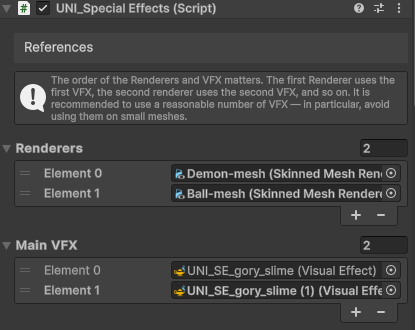
By default, VFX is spawned only on the primary renderer. If your character has multiple renderers, you can add additional VFX references to the Special Effects script, but as mentioned at the beginning, you should proceed with caution from a performance standpoint when using higher amount of mesh sampling and avoid using it altogether on very small meshes.
The order of the Renderers and VFX matters. The first Renderer uses the first VFX, the second renderer uses the second VFX, and so on.
To create new VFX instances and use them for secondary and additional meshes, simply duplicate the Special Effects prefab on your character and remove the Special Effects script from those duplicates. Then add those references to Main VFX and use Synchronize VFX button. You need to adjust the ParticleSpawnRateMultiplier and DissolveSpawnRateMultiplier properties in the new VFX based on the mesh size.
You can disable ShowCenterParticles on duplicated VFX so that you don’t get duplicated particles which are meant to appear only once – for example 6D explosions.