Asset Mage W

Troubleshooting

❌ VFX aren’t working after importing Special Effects.
✅ You should follow the installation procedure:
1. Install Visual Effect Graph from the Package Manager.
2. Restart the editor.
3. Import Special Effects VFX pack.
If you didn’t follow this procedure, the easiest fix is to delete UNI VFX 6D folder, restart Unity Editor and install this Pack again.

Moreover you can use 'Edit → VFX → Rebuild And Save All VFX Graphs' in the Editor’s top menu.

❌ Mesh sampled particles are spawning from one place.
✅ This signals problem with Uniform Baker. In the editor, you can use Bake button in the Special Effects prefab in your character/object to recalculate and store particle uniform distribution.

If this appears in the game you may have reached its limitations. For more information on this topic, see the section on Uniform Baker.
❌ Mesh sampled particles aren’t appearing at all.
✅ To use mesh sampling, Read/Write must be enabled in associated model import settings. This is done automatically for the primary renderer in the Integrate tool. If you change the primary renderer or use more renderers, you may need to set it manually.

The Overlay Special Effect looks weird on my low poly character.
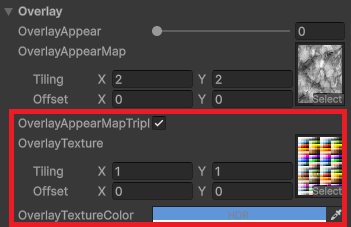
✅ By design, the Overlay Special Effect uses UV to place the Overlay texture on the character. Low poly characters usually use scrambled UVs to achieve the desired look. The easiest fix is to put your base texture as a OverlayTexture, set Tilling to 1 and use OverlayTextureColor as the tint. Alternatively, you can duplicate the base texture and edit it in a graphics editor (such as Photoshop) to better match your desired look of the Overlay.

These two material properties come in handy as well when using Special Effects on low poly characters: OverlayAppearMapTriplanar and AdditionalEmissionTriplanar.

Everything is in your hands, so you can customize the shader in Shader Graph however you like to suit the specific needs of your project.

❌ Dissolve VFX is completely out of sync with Dissolve on the material when using VFX with mesh sampling.
✅ Make sure you are making changes to all materials that the character have and use the Synchronize VFX button in the script (or call SynchronizeVFX() ) to ensure that the relevant data is passed to VFX.

A higher value for the DissolveObjectPatternPower property in the material may cause visual inconsistencies. Don’t forget that this value can be animated in the script, which takes precedence over the value in the material.

When using characters with multiple renderers, Dissolve and Pulse with Object Direction (X/Y/Z) may be misaligned. Omnidirectional options will work reliably.
❌ When testing new Animation Settings in Play mode, the changes do not show up.
✅ Don’t forget to use Rebuild Animation Cache button in the script to sync with the new values.
❌ In HDRP, Skinned meshes appear blurry, as if they were moving, even though they are standing still.
✅ In HDRP, you can't use Motion Blur together with GPU instancing on the Special Effects materials. Disabling one or another will fix the issue.
✅ As I mentioned before, characters/models come in wide variety of shapes and sizes, so if you run into any problems, don’t hesitate to email me: AssetMage@Webyw.cz