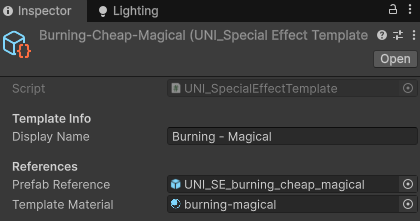
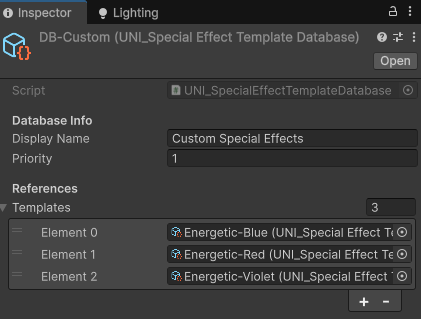
You can prepare your own Templates and Databases to use in Special Effects Integrate tool to speed up your workflow.
First you need to prepare your own Special Effects prefab and material. The easiest way is to copy the existing files and customize them to your liking.
Create a Template by right clicking in the Project window and choosing: ‘Create → UNI VFX → Special Effect Template’. Put your new file references there and choose Display name.
As a last step it’s recommended to create a Database of your custom Special Effects. To create one, right click in the Project window and choose: ‘Create → UNI VFX → Special Effect Template Database’. Add all your Templates and choose Display name. With priority 1, it will appear first in the list of Databases in the Special Effects Integrate tool.
Keep in mind that Integrate tool checks for Databases in the project when the window is initialized. To repopulate the Databases list, close the Special Effects Tools window and open it again.
Na těchto stránkách jsou mimo nezbytné využívány ještě cookies pro měření návštěvnosti a pro potřeby online marketingu. Buď můžete souhlasit s použitím všech cookies nebo si je nastavit podle sebe:
Marketingové cookies pomáhají reklamním systémům vyhodnocovat reklamní kampaně a lépe pochopit preference zákazníků. Díky tomu mohou reklamní systémy v určitých případech vybírat relevantnější reklamní sdělení.
Cookie
Délka
Popis
_gcl_au
3 měsíce
Využíváno službou GoogleAdsense pro vyhodnocení efektivnosti reklamních kampaní.
IDE
13 měsíců
Používá doubleclick.net pro zobrazování cílené reklamy.
NID
6 měsíců
Obsahují jedinečné ID, pomocí kterého si Google pamatuje nastavení návštěvníka.
test_cookie
15 minut
Cookie doubleclick.net ověřující, jestli zařízení může ukládat cookies.