Certain VFX particles can inherit some of the character's velocity. This looks good, for example, with fire particles that seem to trail slightly behind a moving character instead of staying where they spawned.
By default, this works automatically for Skinned Meshes in prefabs with Mesh Sampling. To use this on the standard Mesh renderers or Cheap prefab variants, you have two options: use Velocity Binder or calculate the velocity in your script.
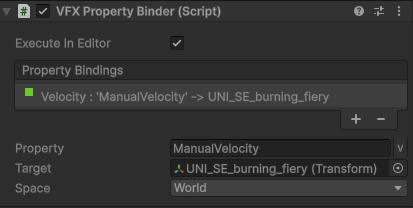
Velocity Binder can be added as another component of the Special Effects prefab. To configure this correctly, enter "ManualVelocity" in the
Property field, select the Special Effects prefab as the
Target, and select
World in the Space field. Don’t forget to check
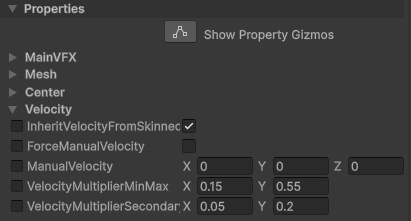
ForceManualVelocity checkbox in the Visual Effect component to use
ManualVelocity value.
Velocity Binder and the default sampling of velocity for Skinned Meshes are using raw data. This can cause issue if the character moves erratically at high speed. To resolve this issue, you can either disable speed inheritance entirely or calculate the smoothed velocity in your script according to your needs. You can send the calculated velocity to VFX by
setting the exposed property:
ManualVelocity (vector3).